What to Include in a Press Release That Journalists Actually Read
Journalists receive hundreds of press releases every week — and most go unread. According to the Cision 2026 State of the Media Report, 72% of journalists say fewer than a quarter of the pitches they receive are actually relevant to their beat. In other words, the problem isn't just volume — it's the content itself.
A well-crafted press release isn't just a formal announcement. It's a carefully structured document that gives a journalist everything they need to decide, in under 30 seconds, whether to cover your story. Get the structure right, and your press release becomes a journalist's starting point. Get it wrong, and it joins the pile of deleted emails.
This guide breaks down exactly what to include in a press release — from the headline to the boilerplate — so that when journalists open yours, they actually keep reading.
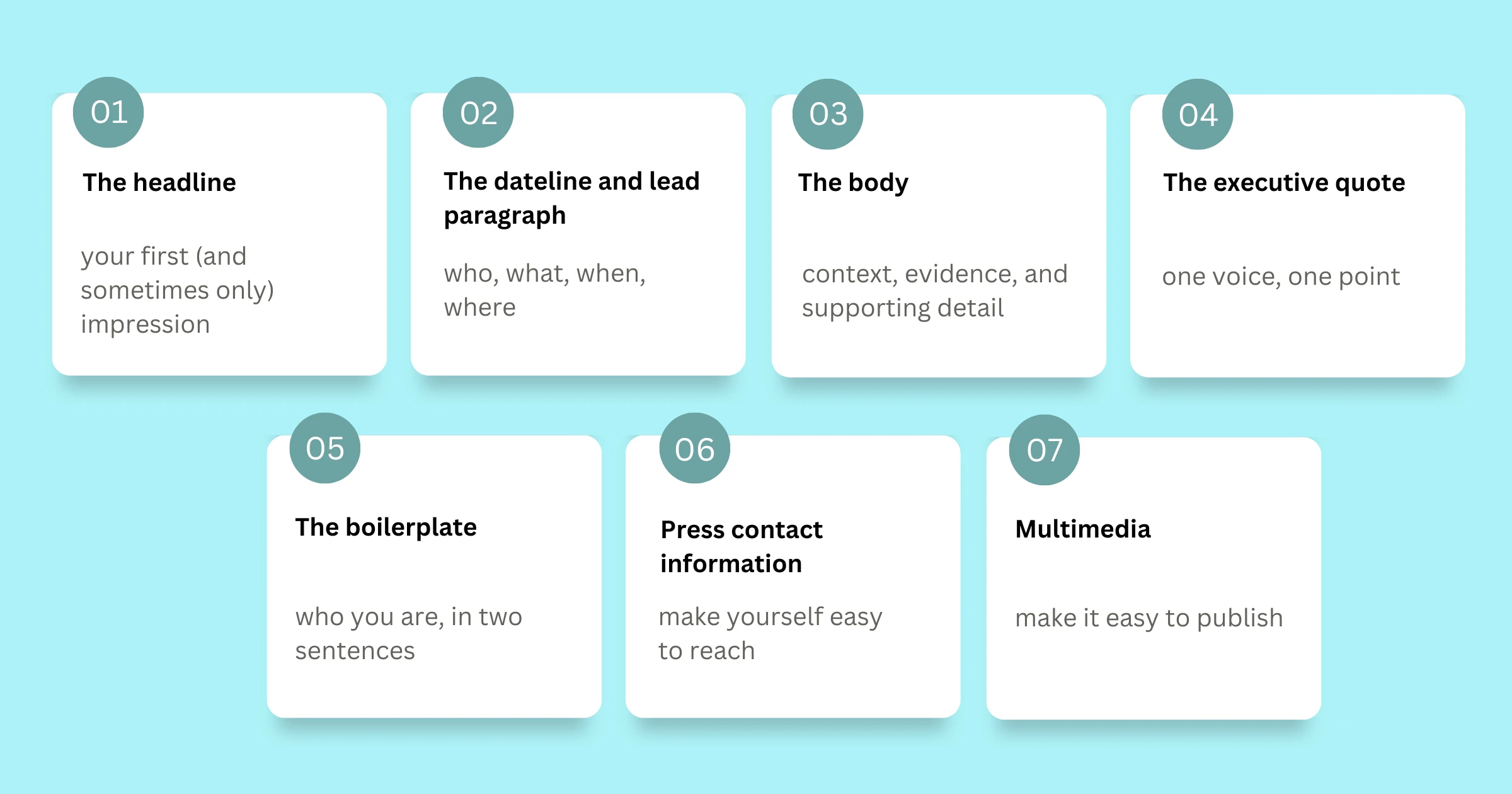
The headline: your first (and sometimes only) impression
The headline is the single most important line in your press release. A journalist skimming their inbox makes a split-second decision based on it. If your headline reads like corporate copy, it will be ignored. If it reads like a news story, it has a chance.
A strong press release headline should do three things: communicate the news clearly, identify who it involves, and hint at why it matters. Consider the difference between:
- Weak: "Company X Announces New Product Launch"
- Strong: "EdTech startup raises $5M to bring AI tutoring to underserved schools in Southeast Asia."
The second headline answers the journalist's first question: why should my readers care? Lead with the outcome, not the activity.
Keep your headline under 100 characters where possible. Subheadings — a brief second line that expands on the headline — are optional but useful for adding context without overloading the main title.
The dateline and lead paragraph: who, what, when, where
Directly beneath the headline comes your dateline — the city, state, and date of the announcement — followed by the lead paragraph.
The lead paragraph is the most critical body copy in the entire document. It must answer the five Ws in no more than 2-3 sentences:
- Who is making the announcement?
- What is the news?
- When is it happening or has it happened?
- Where does it apply or take place?
- Why does it matter?
A journalist who reads only your lead paragraph should walk away with a complete, accurate picture of the announcement. Everything that follows is supporting detail. Write the lead as if it might be the only sentence that gets read — because sometimes, it is.
The body: context, evidence, and supporting detail
The body of a press release typically runs two to four paragraphs. It should expand on the lead with supporting context and evidence — not marketing copy.
Think of it as the inverted pyramid structure used in journalism: most important information first, supporting details second, background last. This structure ensures that even if an editor cuts the bottom half of your release, the essential information survives.
What belongs in the body:
- Specific numbers, data points, or research that substantiate the announcement
- A short explanation of the context — why is this happening now?
- How the news affects the reader, customer, or broader industry
- Any notable partnerships, integrations, or stakeholders involved
Avoid filler phrases like "we are excited to announce" or "best-in-class solution." These are meaningless to a journalist and undercut your credibility. Every sentence in the body should either add information or be cut.
The executive quote: one voice, one point
Almost every press release includes at least one quote — typically from a founder, CEO, or senior leader. Done well, it adds a human perspective. Done poorly, it reads like a press release within a press release.
An effective quote does one of two things: it explains the why behind the announcement (the motivation, mission, or meaning), or it speaks to the impact from a stakeholder's perspective.
What a good quote looks like: "We built this because we kept seeing the same gap — companies with great stories, no structured way to tell them. That problem has a real cost."
What a bad quote looks like: "We are thrilled to announce this incredible milestone and look forward to continued growth."
The second quote says nothing. A journalist won't use it — and it signals that no one at your company has anything interesting to say.
Keep the quote to two to three sentences. It should sound like a person speaking, not a press release.
Supporting data and third-party validation
Press releases that include credible data points and third-party validation are consistently more likely to earn coverage. A statistic doesn't just add authority — it often becomes the hook the journalist leads with in their story.
When including data:
- Always cite the source — a reputable research firm, an industry report, or your own original research
- Make sure the data is recent — figures from 2019 won't carry much weight in 2025
- Connect the data directly to your announcement — don't include a statistic just to appear credible
If you have conducted original research as part of your announcement — a survey, a product benchmark, a customer study — include the methodology briefly. Journalists who cover data-driven stories will appreciate the transparency.
The boilerplate: who you are, in two sentences
The boilerplate is a standardized paragraph at the end of every press release that describes your company. It is typically preceded by the label "About [Company Name]."
A good boilerplate covers:
- What your company does (one clear sentence)
- Who it serves
- Any key metrics: founded year, number of customers, notable recognitions
- A link to your website
Your boilerplate should be the same across all your press releases, with minor updates as your company grows. It is not an opportunity for additional marketing copy — keep it factual, tight, and under 75 words.
Press contact information: make yourself easy to reach
One of the most common mistakes in press releases is burying or omitting the press contact. A journalist who wants to follow up needs a real name, a real email address, and ideally a phone number. Sending them to a generic contact form kills momentum.
Press contact details should appear at the very top or very bottom of the release — somewhere immediately visible. Include:
- Full name of the media contact
- Title or role
- Direct email address
- Phone number (optional but valued)
If you work with a PR agency, include the agency contact in addition to an internal point of contact. The goal is to remove every possible barrier between a journalist's question and a usable answer.
Multimedia: make it easy to publish
Press releases that include multimedia assets — images, product screenshots, founder headshots, infographics — consistently outperform text-only releases in terms of pickup rates. Publications want to illustrate their stories, and providing ready-to-use visuals removes one more barrier to coverage.
What to include or make available:
- High-resolution product images (minimum 1200px wide, landscape preferred)
- Approved founder or executive headshots
- Company logo in PNG and SVG formats
- Links to a downloadable press kit, if available
Avoid embedding large images directly in the body of the press release. Instead, provide a link to a media folder, a Google Drive, or — even better — a dedicated newsroom page where journalists can access everything they need in one organized place.
How SubPage makes press releases work harder for you
Writing a press release is one part of the equation. The other part is making sure journalists can find it, access supporting assets, and contact you — all without friction. That's where having a dedicated newsroom matters.
SubPage is a purpose-built platform that lets businesses create a professional, press-ready newsroom without writing a single line of code. Every press release you publish lives in a structured, searchable hub — not scattered across email threads or buried in a blog.
One of SubPage's most valuable features for press release distribution is auto-fetch press mentions. Instead of manually tracking where your company has been covered, SubPage automatically searches the web for media mentions and surfaces them inside your newsroom dashboard. You can review, approve, and add them directly to your press coverage section — saving your team hours of manual work each month.
Beyond auto-fetch, SubPage provides:
- Press-specific newsroom layouts designed for media credibility, not generic blog templates
- Dedicated press contact and press kit sections that journalists can find immediately
- AI-assisted writing tools for drafting press releases, executive quotes, and announcement copy faster
- Custom domain and branding support so your newsroom feels like a native extension of your website
- Team collaboration so your PR team can draft, review, and publish without bottlenecks
You can read more about how a well-structured newsroom page builds credibility with journalists, investors, and partners in the SubPage blog: How a newsroom page builds trust with investors, partners, and customers.
Also worth exploring: What is a business newsroom and why does every company need one? — a useful foundation before you build out your press release strategy.
Common press release mistakes that lose journalist interest
Even well-intentioned press releases fail because of avoidable structural errors. Here's what to watch for:
- Burying the news. If the actual announcement doesn't appear until paragraph three, most journalists won't get there. Lead with the news.
- Writing for a marketing audience, not a news audience. Press releases that read like product pages signal that the company doesn't understand what journalism needs.
- No clear news angle. "Company updates website" is not news. "Company redesigns platform after 40% of users report navigation issues" is. Find the angle.
- Too long. A press release should be one page, 400 to 600 words. Anything longer dilutes the signal and loses attention.
- Sending without a specific journalist in mind. Mass distribution to irrelevant contacts wastes relationships. Research the right beat before you send.
What journalists actually want: a quick checklist
Before sending your press release, run through this list:
- Does the headline communicate the news clearly and immediately?
- Does the lead paragraph answer who, what, when, where, and why?
- Is there a credible data point or third-party validation?
- Is the executive quote useful and quotable — not generic?
- Are press contact details visible and complete?
- Are multimedia assets available or linked?
- Is the boilerplate concise and factual?
- Is the total length under 600 words?
- Is it published in a newsroom that journalists can reference for context?
If you can check every box, your press release is already in the top tier of what lands in a journalist's inbox.
Conclusion
A press release that journalists actually read isn't the result of luck — it's the result of structure. When you lead with clear news, support it with evidence, make yourself easy to reach, and house everything in a professional newsroom, your announcement has a real chance of earning the coverage it deserves.
SubPage gives you everything you need to publish press releases the right way — with auto-fetch press mentions, press-ready layouts, and a newsroom built for media credibility. Start building your newsroom for free at SubPage and make sure your next announcement gets the attention it deserves.
