What is a Business Newsroom and Why Does Every Company Need One?
In an era where trust in institutions has become a "buy or boycott" factor, how a company communicates its story to the world is no longer optional — it is a core business function. Yet most companies still rely on scattered press releases, outdated media pages, or a simple "contact us" form to handle all their PR needs. That is where a business newsroom changes everything.
About 68% of global brands now have a newsroom or live press section on their website, and the gap between companies that do and those that do not is becoming impossible to ignore. If you are wondering what a business newsroom is, what goes inside one, and why your company needs one regardless of size, this guide covers all of it.
What is a business newsroom?
A business newsroom — also called an online pressroom, media center, or press page — is a dedicated section of your company website that consolidates everything a journalist, investor, blogger, or potential partner needs to cover your brand accurately and quickly.
A press page, also known as an online newsroom, is a key part of a B2B website designed to make communication between a company and the media easier. It acts as a central hub, allowing journalists, media professionals, and the public to access complete and current information about an organization.
Think of it as your company's always-on PR desk — one that is available at 2 a.m. when a journalist in a different time zone is fact-checking a story about your industry.
A well-built business newsroom typically contains:
- Press releases and announcements — Product launches, funding rounds, partnerships, leadership changes, and any news that affects your brand's public standing.
- Media kit — Your company's logo files, brand guidelines, executive headshots, product screenshots, and other downloadable assets that journalists need to publish a story without chasing your team for resources.
- Company overview — A concise description of who you are, what you do, your founding story, key milestones, and your mission — written for a media audience, not a sales audience.
- Press coverage — A curated list or feed of media mentions, articles, and interviews that have featured your company, which signals credibility and helps journalists gauge your newsworthiness.
- PR contact details — A dedicated media contact with a name, email, and ideally a phone number, so journalists are never left hunting through a generic contact form.
- Social feeds and multimedia — Video content, podcast appearances, event footage, and social links that give a richer picture of your brand voice.
- When these elements live in one organized, branded location, your business is media-ready at any moment.
What to include in a business newsroom (a practical checklist)
Whether you are setting up your first newsroom or improving an existing one, here are the elements that matter most:
- Company boilerplate — A standardized 100–150-word description of your company that journalists can paste directly into an article. Keep it factual and third-person.
- Executive bios and photos — High-resolution headshots and brief bios for your CEO, co-founders, and key spokespeople. Journalists writing profile pieces will need these.
- Press release archive — All announcements organized by date with clear headlines. Older releases are still valuable for journalists researching your company history.
- Brand asset downloads — Logo files in multiple formats (SVG, PNG, dark and light versions), brand colors, and usage guidelines so your brand is represented accurately in every article.
- Media mentions feed — A regularly updated list of articles and interviews featuring your company. This shows journalists that others have covered you and builds credibility.
- Dedicated media contact — A specific person or team email for press inquiries, not a general "hello@" address. Journalists work on tight deadlines and need to reach someone fast.
- Press inquiry form — For companies that receive high volumes of media requests, a structured form helps triage and route inquiries efficiently.
Common mistakes companies make with their newsrooms
Even companies that have a newsroom often undercut its value. Avoid these pitfalls:
- Treating it as a dumping ground — Every press release ever written, uploaded without organization or context, does more harm than good. Curate, categorize, and make navigation easy.
- Using it as a sales page — Your newsroom is for journalists and media stakeholders, not potential customers. Keep the tone factual and the content informational, not promotional.
- Letting it go stale — A newsroom with the last press release dated 18 months ago tells the media your company is either dormant or disorganized. Regular updates — even for minor milestones — keep it alive.
- Hiding it in the footer — If your newsroom is not linked from your main navigation or "About" section, journalists will not find it. Make it accessible.
- Missing contact information — No dedicated press contact is one of the most common failures. If a journalist cannot quickly find who to call, they will call someone else.
Why SubPage is the smartest way to launch your business newsroom
Most companies put off building a newsroom because they assume it is a large project — something that goes on the roadmap and never quite makes it to the top. SubPage was built to remove that excuse entirely.
SubPage's newsroom tool is not a generic page builder with a "press" template bolted on. It is a dedicated newsroom product designed around how PR and communications teams actually work. The difference shows up immediately in how quickly you can go from zero to a live, credible press page.
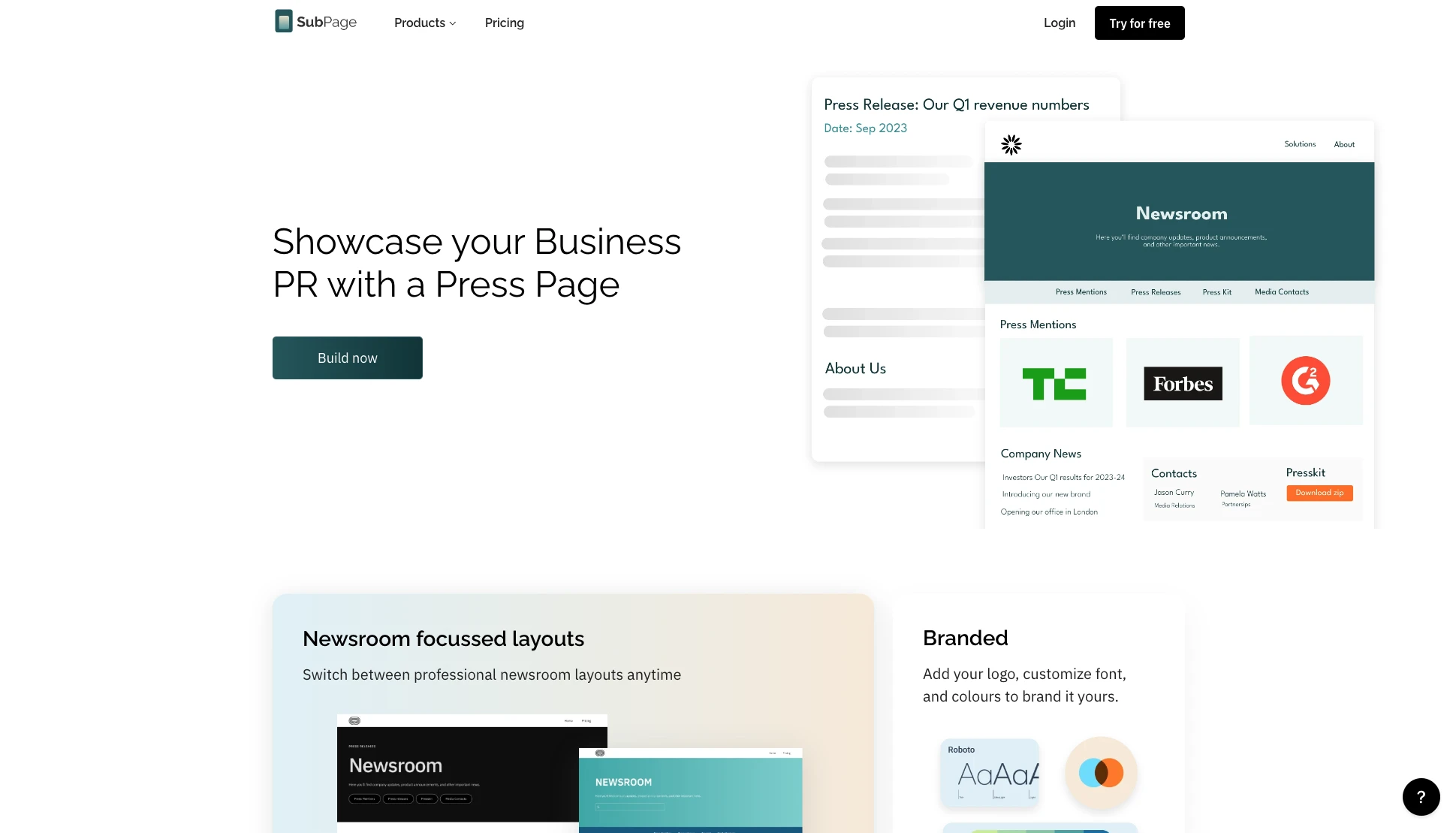
What sets SubPage apart is how well the product maps to the real workflow of maintaining a newsroom over time — not just launching one. Publishing a press release is as simple as writing a post. Adding a media mention takes a few clicks. Updating your press contacts or swapping your logo requires no developer involvement. For teams that do not have a dedicated web team managing every page update, this matters enormously.
SubPage also connects your newsroom to the rest of your company's web presence. If you are already using SubPage for your blog, help center, or careers page, your newsroom sits within the same workspace, uses the same brand settings, and is managed by the same team — without juggling multiple tools or login credentials.
For growing companies that want their newsroom to reflect the seriousness of their brand without the overhead of a custom build, SubPage offers the right balance of structure, flexibility, and speed. You can live the same day you decide to start.
Conclusion
A business newsroom is not a luxury reserved for enterprise companies or PR agencies. It is a foundational communication asset that any company — at any stage — should have. It builds media trust, strengthens brand credibility, supports your SEO strategy, and gives you control over your own narrative when it matters most.
The companies that invest in a newsroom early are the ones that are media-ready when opportunity knocks. And with tools like SubPage, setting one up no longer requires a full engineering sprint or a dedicated web team.
If you are ready to stop being invisible to the press and start building a brand that journalists can easily cover, now is the time to act. Create your business newsroom with SubPage — free to start →
