How to Use RSS Feeds to Grow Your Blog Audience Passively
Most bloggers focus entirely on active distribution — sharing posts on social media, sending newsletters, and running paid ads. But there is a quieter, more durable growth channel that runs in the background without any ongoing effort: RSS feeds.
RSS adoption climbed 34% year-over-year in 2026 as professionals abandoned algorithmic feeds for chronological, source-controlled reading. Feedly alone — one of the most popular RSS readers on the market — serves over 15 million users actively following blogs and content sources they trust. That is a substantial audience of engaged readers, many of whom are looking for quality content to subscribe to right now.
The challenge is that most bloggers either do not have a blog RSS feed set up correctly or they have one running but are not using it strategically. This guide covers what RSS feeds are, why they matter for growing a blog audience, how to find and share your blog RSS feed URL, and how to make your feed work harder for passive, compounding growth. SubPage makes this straightforward to set up regardless of where you are in your blogging journey.
What is an RSS feed for a blog?
RSS stands for Really Simple Syndication. A blog RSS feed is a structured data file — typically formatted in XML — that your blog automatically generates whenever you publish a new post. It contains the title, summary, publish date, and a link to each piece of content on your blog.
When a reader subscribes to your RSS blog feed using a reader like Feedly, Inoreader, or NewsBlur, every new post you publish appears in their feed automatically — no email required, no social algorithm to beat, no follow-up needed from you.
Think of it as a subscription layer that sits on top of your blog. Readers opt in once and receive your content indefinitely, on their own terms, in their preferred reading environment.
Why RSS feeds still matter for blog growth
RSS is often described as a relic of the early internet. That framing misses what it actually does. Unlike social media, where visibility is determined by an algorithm you cannot control, RSS delivers your content directly to every subscriber — every time, in chronological order, without interference.
This makes RSS blog feeds particularly valuable for three reasons.
- Ownership of the audience relationship. RSS subscribers have actively chosen to follow your blog. There is no platform between you and the reader. No algorithm decides whether today's post gets shown. No engagement metric determines reach. The content goes out; the subscriber receives it.
- Compounding passive reach. Once a reader subscribes to your blog RSS feed, they receive every future post without any additional effort from you. Unlike social posts that decay within hours, an RSS subscriber compounds over time. Five hundred RSS subscribers today means five hundred guaranteed readers for every post you publish next month, next quarter, and beyond.
- Distribution into other channels. Many newsletter tools, content aggregators, podcast platforms, and AI-powered digest services pull content directly from RSS feeds. Setting up your blog RSS feed URL correctly means your content can flow into those platforms automatically — reaching audiences you never directly targeted.
How to find your blog RSS feed URL
Before you can promote or submit your RSS feed, you need to know your blog's RSS feed URL. This is the direct web address of your blog's feed file.
On most modern blogging platforms, the RSS feed URL follows a predictable pattern. It is typically your blog URL followed by /feed, /rss, or /rss.xml. For example, if your blog lives at yourblog.com, your feed URL is likely yourblog.com/feed to be yourblog.com/rss.xml.
You can verify this by pasting the URL into your browser. If an RSS feed exists, you will see a page of structured XML data or a formatted feed preview. If you are using a dedicated blog platform, you can often find the RSS feed URL in your blog settings or dashboard.
SubPage automatically generates an RSS feed at your blog URL the moment your blog goes live. Your readers can take that URL and add it to their favourite RSS reader — Feedly, Inoreader, NewsBlur, or any other — to receive a notification whenever you publish a new post. No extra configuration, no third-party plugins, no manual setup needed. This is one of the practical advantages of using a purpose-built blog creator like SubPage's blog builder — passive distribution is ready from day one.
Adding an RSS feed to your blog
If your blog does not yet have an RSS feed — or if the existing feed is not properly configured — adding one is a high-value, one-time setup that pays dividends for as long as you publish.
- For blogs on dedicated platforms: Most modern blog platforms, like SubPage, generate RSS feeds automatically. Check your blog settings or documentation for an option to enable or customise your feed. Ensure the feed includes post titles, full or partial content, publish dates, and the canonical URL of each post.
- Making your feed discoverable: Once your feed is active, add a visible RSS subscription link or button to your blog. Many readers actively look for this. Place it in your header, sidebar, or at the end of each post. The easier you make it to subscribe, the more subscribers you accumulate passively over time.
- Validating your feed: Use a free tool like the W3C Feed Validation Service or Feed Validator to confirm your blog RSS feed is correctly structured. An invalid or malformed feed will not render properly in RSS readers and will cost you potential subscribers.
- Including the feed link in your site's HTML head: Adding a
<link>tag in your page's HTML header that references your RSS feed URL allows browsers and RSS readers to auto-detect your feed. This is a low-effort, high-impact step that many bloggers skip.
How to grow your blog audience passively with RSS
Having a blog RSS feed is the starting point. Actively distributing and promoting it is what turns it into a growth channel.
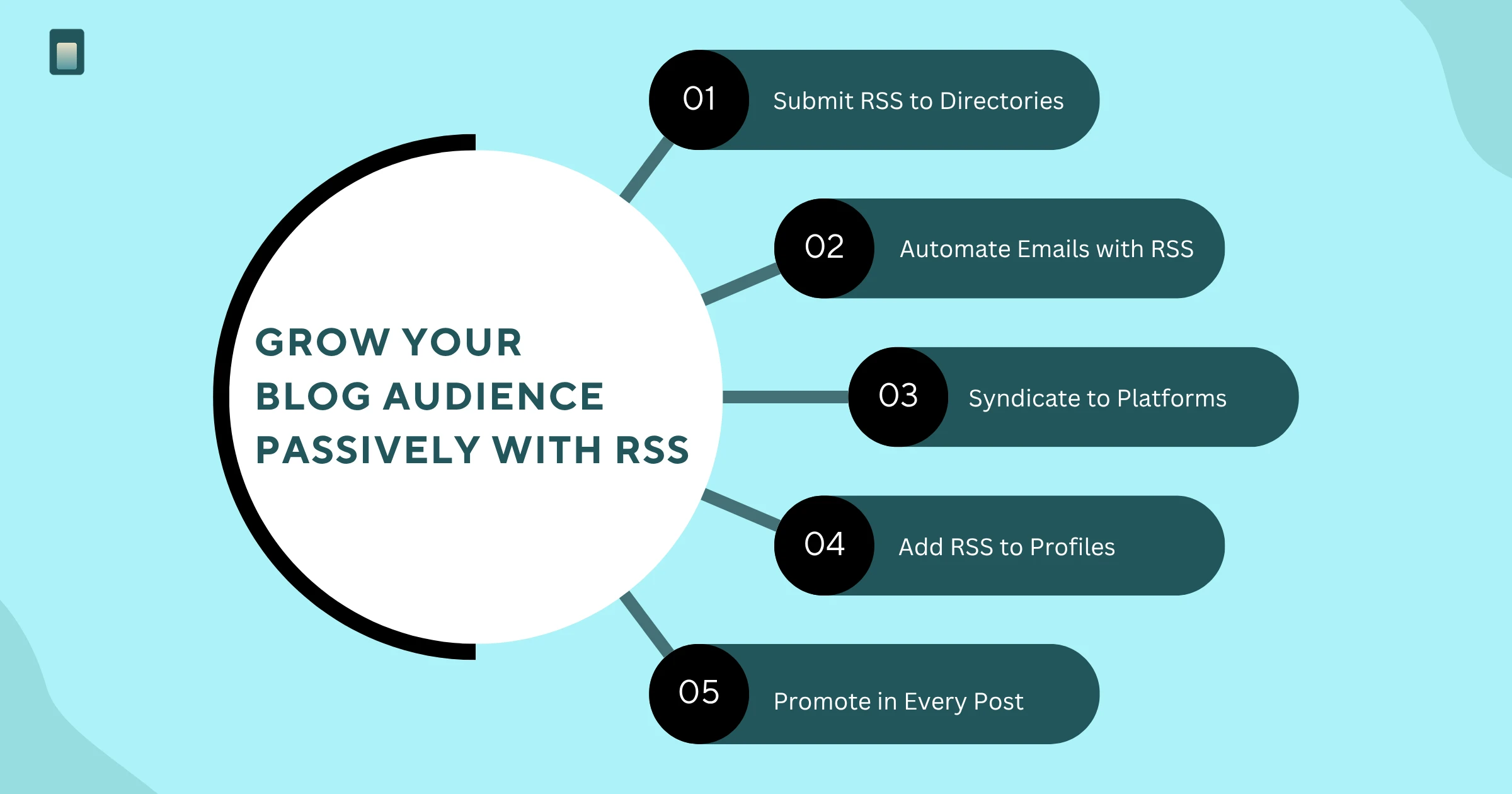
Submit your feed to RSS directories and aggregators
RSS directories are platforms that index blog feeds and surface them to readers looking for content in specific categories. Submitting your blog RSS feed URL to directories like Feedly, Inoreader, Feedspot, and AllTop increases the likelihood of new readers discovering your blog organically.
This is a one-time submission that compounds over time. As your content is indexed and associated with specific topics, readers searching for those topics inside feed directories find your blog — without any further action from you.
Use your RSS feed to power automated newsletters
Many email marketing platforms — including Mailchimp, ConvertKit, and Beehiiv — support RSS-to-email automation. You connect your blog RSS feed URL to the platform, and every time you publish a new post, an email is automatically sent to your subscriber list with the post title, excerpt, and link.
This removes the manual step of writing a newsletter every time you publish. Your blog post becomes the newsletter. The two channels — RSS and email — run together without doubling your workload. If you want to go deeper on building the conversion layer into your blog, how to turn blog content into qualified leads covers how to make every post work harder beyond just distribution.
Syndicate to content aggregators and curated platforms
Several content platforms pull posts directly from RSS blog feeds and republish them to their audiences. Medium's RSS import feature, for example, allows you to automatically mirror your blog posts to your Medium profile, exposing your content to Medium's search and discovery ecosystem.
Similarly, platforms like Flipboard, Pocket, and various niche community aggregators support RSS syndication. Each additional channel your content appears in is an audience touchpoint that requires zero ongoing maintenance once the feed is connected.
Include your RSS feed URL in your email signature and bio
This costs nothing and requires two minutes of setup. Adding your blog RSS feed URL to your email signature, LinkedIn bio, and author profiles on third-party platforms makes it easy for anyone who encounters your content to subscribe directly. Over time, this passive signal adds up to a meaningful subscriber base.
Promote your RSS feed in every new post
A simple line at the end of each post — "Subscribe to this blog via RSS" with a direct link to your feed URL — catches readers at the moment they have just consumed your content and are most likely to want more. This is one of the highest-intent moments to ask for a subscription, and most bloggers miss it entirely.
RSS and SEO: the indirect connection
RSS feeds do not directly influence search engine rankings, but they create conditions that support better SEO performance in two specific ways.
- Faster content indexing. When you publish a new post and your RSS feed updates, Google's crawlers pick up the feed signal and index your content faster than they might through organic discovery alone. For time-sensitive content in particular, this matters.
- Backlinks through syndication. When your RSS blog feed is picked up by aggregators, curated newsletters, and community platforms, it often generates inbound links back to your original post. These links contribute to your blog's domain authority over time — a compounding SEO benefit that begins with a single feed submission.
For a deeper look at building SEO performance into your blog from the ground up, the SubPage guide on blog SEO — your guide for higher rankings is a practical companion to the distribution work covered here.
What makes a great RSS feed experience
Not all RSS blog feeds are equal. The quality of your feed affects whether subscribers stay engaged or quietly unsubscribe.
- Include enough content in each entry. Some blogs publish only the post title and URL in their RSS feed, forcing readers to click through for any context. While this drives traffic, it frustrates RSS readers who use feeds specifically to consume content in their preferred environment. Including a meaningful excerpt or the full post body keeps subscribers engaged and reinforces the value of following your feed.
- Publish consistently. RSS subscribers who go weeks without a new entry from you will deprioritise your feed or remove it. A consistent publishing cadence — even one or two posts per month — keeps your blog active in subscriber queues and builds the habit of reading your content. For a structured approach to maintaining that consistency, how to structure blog posts for maximum conversions covers how to produce posts that are worth showing up for.
- Use descriptive titles. In an RSS reader, your post title is often the only element competing for attention against dozens of other feeds. Titles that clearly communicate what the reader will get — without being vague or clever for its own sake — earn the click.
Conclusion
RSS feeds are one of the most underused growth channels in blogging — not because they are difficult to set up, but because most bloggers focus entirely on active distribution and overlook the passive layer that compounds quietly underneath it.
Setting up your blog RSS feed URL correctly, submitting it to the right directories, connecting it to your email platform, and syndicating it across relevant aggregators creates a distribution system that runs without ongoing effort. Every subscriber you accumulate via RSS is a guaranteed reader for every future post — no algorithm required.
SubPage automatically generates an RSS feed at your blog URL — so the moment your blog goes live, your readers can add it to their favourite RSS reader and get notified every time you publish. Alongside that, SubPage comes with built-in SEO tools, newsletter signups, and lead capture features that turn passive readers into active leads. If you are ready to build a blog that grows while you work on other things, start for free with SubPage today.
