How to Structure Blog Posts for Maximum Conversions
Most blog posts have the same problem. They attract traffic, get decent rankings, and then do absolutely nothing with the readers who show up. Visitors land, skim, and leave — without signing up, downloading, or taking any action at all.
Here's what the data says: companies that blog generate 67% more leads than those that don't (DemandMetric). And content marketing generates 3 times more leads than traditional marketing while costing 62% less. So the potential is clearly there. But potential alone doesn't pay.
The difference between a blog post that converts and one that doesn't usually has nothing to do with the quality of writing. It comes down to structure. How a post is organized, where CTAs are placed, how headings guide the reader, and how well the content builds trust — these are the factors that separate high-performing blogs from average ones.
In this guide, you'll learn the exact structure that turns blog posts into conversion machines. And if you're looking for a tool that helps you implement all of this without the technical hassle, SubPage's blog builder is built precisely for that.
What is blog conversion, and why does it matter
Before diving into structure, it helps to define what we're actually optimizing for.
A blog conversion happens when a reader takes a meaningful action after reading your content. That action could be signing up for your newsletter, starting a free trial, downloading an ebook, booking a demo, or clicking through to a product page. In short, it's the moment a passive reader becomes an active lead or customer.
Your blog conversion rate is the percentage of readers who take that action out of the total number of visitors. If 1,000 people read your post and 20 sign up for your newsletter, your blog conversion rate is 2%. The industry average sits between 1% and 2%, but well-structured blog posts consistently hit 3% to 5% and beyond.
What drives that gap? Structure. A well-structured blog post doesn't just inform — it guides. It leads the reader from curiosity to trust to action in a natural, frictionless way. Understanding the broader purpose of your blog content is what makes this possible — each post should have one clear conversion goal before a single word is written.
Start with a strong blog introduction — The hook
You have roughly five to ten seconds to convince a reader to stay. That's not an exaggeration. Research shows that 55% of readers spend less than 15 seconds on a webpage. If your introduction doesn't immediately signal value, they're gone.
A high-converting blog introduction follows a simple pattern. Open with the problem your reader is experiencing. Follow it with a data point or relatable insight that validates that problem. Then preview the solution they're about to get. This three-part hook tells the reader: I understand your situation, this is real, and I'm about to help you fix it.
What to avoid is equally important. Long preambles about how important the topic is, vague promises, or introductions that bury the point under background context all kill momentum before it builds. Get to the value fast. Earn the scroll.
Use clear headings to guide the reader
Here's something most writers don't account for: 79% of readers scan blog posts before they decide whether to read word-for-word. That means your headings are doing a significant amount of heavy lifting before a single paragraph gets read.
Clear, descriptive headings serve two purposes. First, they help scanners understand the structure of your argument and decide whether the post is worth their time. Second, they signal to search engines what each section covers, which directly supports your blog's SEO performance and improves your overall blog conversion rate by attracting higher-intent traffic.
Use H2 headings for your main sections and H3 headings for supporting points within those sections. Make each heading descriptive enough to stand alone — a reader should be able to understand the post's full scope just by reading the headings top to bottom. For a deeper look at what makes SaaS blog content work and what to avoid, the guide on The Dos and Don'ts of SaaS Blogging is a practical reference.
Use data, examples, and visual breaks
Trust is the currency of conversion. Before a reader will take action on your recommendation, they need to believe you know what you're talking about. Data, real-world examples, and well-placed visuals are the fastest way to build that trust inside a blog post.
Statistics give your claims credibility. Articles with relevant images get 94% more views than those without. Examples show readers how concepts apply in practice, moving them from understanding to belief. Visual breaks — short paragraphs, bullet points, pull quotes, screenshots — keep the reading experience light and maintain momentum through longer sections.
One practical rule: never let a paragraph run more than four or five lines. Dense walls of text signal effort to the reader, and effort is the enemy of conversion. Make your content easy to consume, and you make it easier to act on.
Place strategic CTAs inside blog posts
This is where most blogs leave conversions on the table. The standard approach is a single CTA at the bottom of the post. By the time a reader gets there, many have already left — and those who do reach the end often need a nudge much earlier.
High-converting blog posts place CTAs in three key positions. The first is shortly after the introduction, once the reader has been hooked and understands the value of the post. This captures early converters who already know what they want. The second is mid-article, after a particularly strong insight or data point — the moment when trust is highest, and the reader is most engaged. The third is at the conclusion, as a natural next step after the key takeaways.
CTA types matter too. Not every CTA needs to be a hard sell. Soft CTAs like "read this related post" or "subscribe for weekly insights" work well in the early and mid sections. Harder CTAs like "start your free trial" or "book a demo" perform better at the end, once you've delivered enough value to justify the ask. For a detailed breakdown of how to write CTAs that actually get clicked, the SubPage guide on how to craft compelling CTA's for your SaaS. The blog covers the full playbook.
Add internal links to improve engagement and conversions
Internal linking is one of the most underused conversion tools in content marketing. When done well, it keeps readers on your site longer, guides them deeper into your content funnel, and helps search engines understand the topical authority of your blog — all of which contribute to a higher blog conversion rate over time.
The key is relevance. Link to posts that naturally extend the value of what the reader is currently consuming. A post about blog structure should link to posts about SEO, CTAs, and content strategy — not to unrelated topics. Each internal link is an opportunity to keep a reader engaged rather than letting them drift back to a search results page.
For example, if you're working on improving the SEO performance of your existing posts alongside your structural improvements, " How to Optimize Your Blog with AI seo tools covers the exact tools and techniques to layer on top of a well-structured post.
Optimize blog posts for SEO to drive high-intent traffic
The best blog structure in the world won't convert if nobody finds the post. SEO and conversion optimization aren't competing priorities — they work together. SEO brings in the right readers; structure converts them.
The fundamentals of on-page SEO for blog posts include placing your primary keyword in the title, the first paragraph, at least one subheading, and naturally throughout the body. Meta descriptions should be written as a compelling summary, not an afterthought — they directly influence click-through rates from search results. URLs should be clean and keyword-rich. Images should have descriptive alt text. Page load speed and mobile formatting affect both rankings and bounce rates.
SubPage's blog builder handles many of these technically complex elements automatically — optimized URL structures, meta field support, mobile-responsive layouts, and fast-loading pages — so writers can focus on the content itself rather than the configuration. For a broader look at how content strategy ties into growth, the post on SaaS Content Marketing Tactics to Amplify Your Reach and Impact is worth reading alongside this one.
How SubPage helps you write blog posts that convert
SubPage's blog builder handles many of these technically complex elements automatically — optimized URL structures, meta field support, mobile-responsive layouts, and fast-loading pages — so writers can focus on the content itself rather than the configuration.
Most blog platforms are built for publishing. SubPage's blog builder is built for converting. Every feature in the editor is designed to support the structural principles this guide has outlined — from writing and SEO to lead capture — all in one place. Here is how each piece works.
Built-in SEO Analysis
Publishing a well-written post is only half the job. SubPage's SEO Report tab gives you AI-powered feedback on your article before it ever goes live — flagging gaps in keyword usage, internal and external links, and other on-page signals that directly affect rankings. You see exactly what needs fixing, and you fix it inside the same editor. No switching tabs, no separate SEO tools.
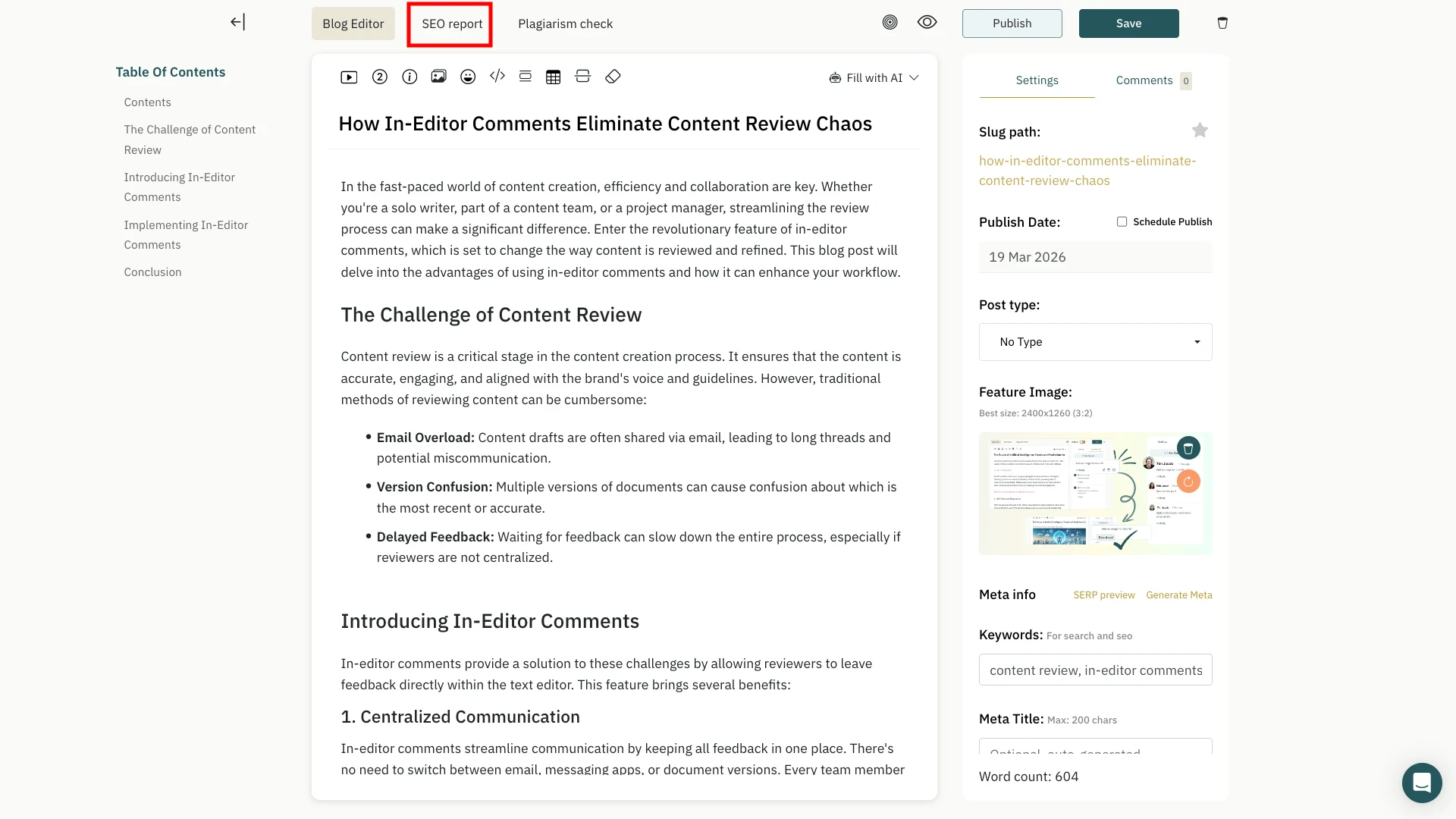
The panel surfaces improvement suggestions alongside what's already working — so you always know what to prioritize and what to leave alone.
AI Writing Tools Inside the Editor
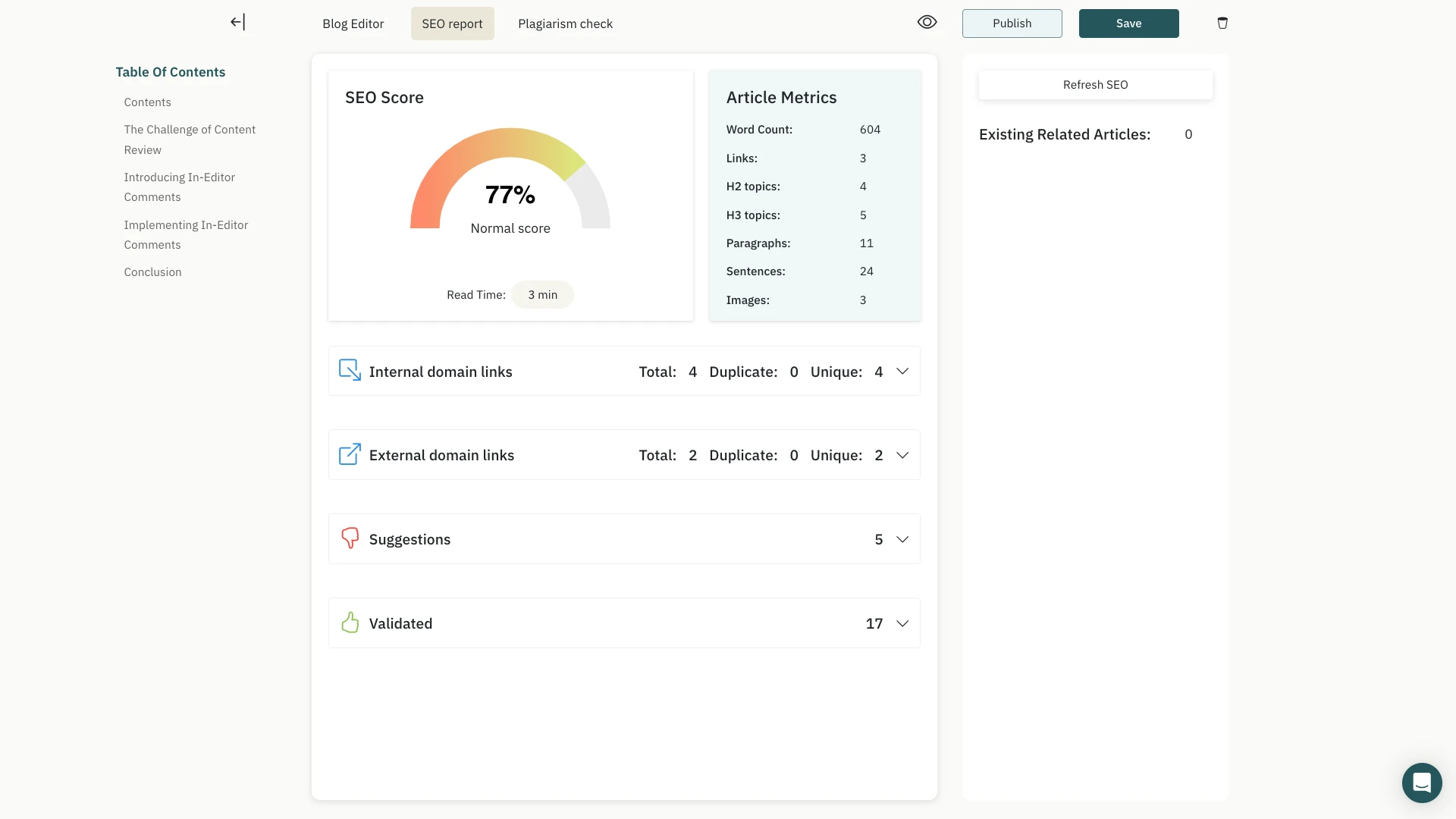
Structuring a post for conversion often means shortening an overly long introduction, expanding a thin section, or adjusting the tone for a broader audience. SubPage's AI assist handles all of this without switching tools. Select any text, click the AI icon in the formatting toolbar, and choose from Rephrase, Make Shorter, Make Longer, or Write About This Text. Changes happen inline — and you can undo instantly if the result does not land right.
Lead Capture Built Into the Blog Layout
Traffic without capture is just traffic. SubPage lets you add a lead form directly to your blog page — no third-party tools, no embed codes, nothing to stitch together. Enable it from your blog dashboard with a single toggle, customize your form fields, and every submitted email flows straight into your dashboard.
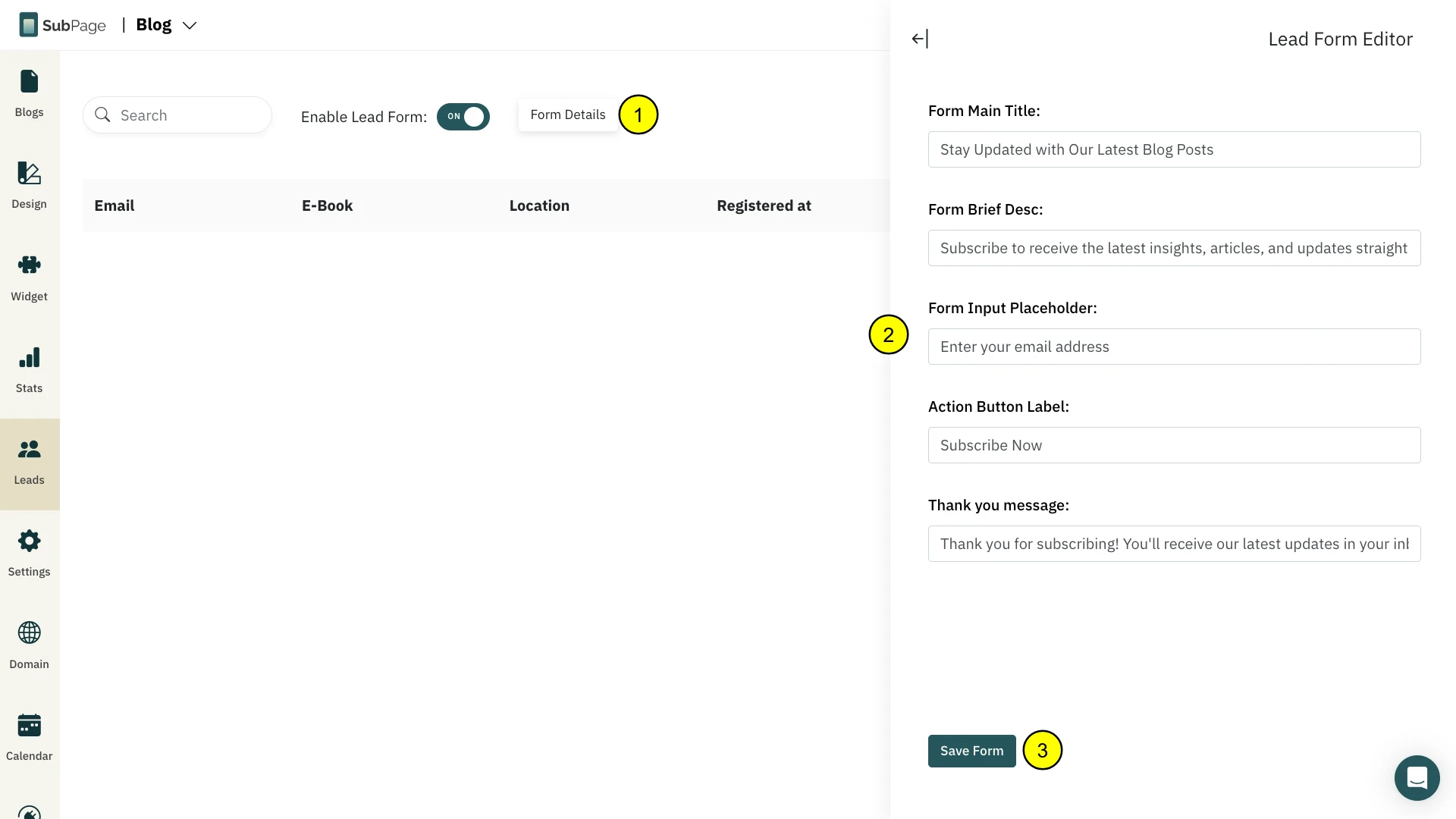
This is what closes the loop between content that attracts readers and a blog that actually builds a pipeline. The structural work — the hooks, the headings, the CTAs — earns the reader's attention. The lead form captures it.
For a broader look at how content strategy ties into growth, the post on SaaS Content Marketing Tactics to Amplify Your Reach and Impact is worth reading alongside this one.
Conclusion
Great blog posts don’t happen by chance. They follow a clear structure that guides readers from a problem to insight and action. Start with a strong hook, use clear headings, add relevant data and examples, place CTAs strategically, and include internal links. Finally, optimize for SEO so the right audience can discover your content and convert.

