Careers Page vs LinkedIn Job Posts: Why You Need Both
Hiring has never been more competitive. Over 87% of professionals say they would consider a new job opportunity when discovered through LinkedIn, while 69% of candidates research a company's careers page before submitting a single application. These two numbers tell a compelling story: job discovery happens on platforms like LinkedIn, but conversion happens on your own turf.
Yet most companies treat these as separate, disconnected efforts — posting on LinkedIn with no careers page to back it up, or building a beautiful careers page that gets zero traffic because it has no distribution. The smarter strategy is to use both together, in sync.
In this guide, we'll break down what each channel does best, where each falls short, and how tools like SubPage let you build a professional careers page and push jobs directly to LinkedIn — all in one place.
What is a Careers Page?
A careers page is the dedicated section of your company website where job seekers can explore open positions, learn about your company culture, and submit applications. It is your owned digital real estate in the hiring process — a place you fully control, brand, and optimize.
Unlike third-party job boards, a careers page lives under your domain. It can include your company story, employee testimonials, team photos, benefits information, and a clean list of open roles, each with its own job description page and application form. It's where employer branding becomes a tangible, candidate-facing experience. If you're evaluating the right tools to build one, this roundup of top tools to create a career page for your website is a useful starting point.
Key benefits of having a Careers Page
A well-built careers page does far more than list open roles. Here's why it's an essential piece of your hiring infrastructure.
- Employer branding you control: Your careers page is the one place where you define the full narrative: your values, mission, team culture, and what makes your workplace unique. No algorithm, no competitor ads, no distractions.
- Better candidate experience: A clear, fast, and mobile-friendly application experience reduces drop-off and improves applicant quality. Candidates who land on a well-designed careers page feel the company is serious about hiring.
- Centralized candidate management: All applications come into one place. No scattered inboxes, no manual tracking. A proper careers page acts as your lightweight applicant tracking system (ATS), keeping your pipeline organized.
- SEO-driven organic traffic: Job pages with proper titles and descriptions can rank on Google. Over time, your careers page becomes an inbound hiring channel, bringing in applicants without any paid spend.
- Single source of truth: Candidates always see your most current, accurate job listings. No outdated posts floating around third-party sites, creating confusion in your pipeline.
What Are LinkedIn Job Posts?
LinkedIn job posts are role listings published directly on the LinkedIn platform — the world's largest professional social network with over 1 billion members. When you post a job on LinkedIn, it appears in search results, is surfaced to relevant professionals via LinkedIn's algorithm, and can be promoted through paid options for even wider reach.
LinkedIn job posts include a job title, description, location, required skills, and a call-to-action to apply. Candidates can apply directly on LinkedIn using their profile data or be redirected to an external URL — like your careers page.
Benefits of posting jobs on LinkedIn
- Massive professional network: LinkedIn connects you with over a billion professionals globally, putting your job description in front of passive and active candidates alike.
- Smart targeting and job alerts: LinkedIn's algorithm matches your job to relevant professionals based on skills, experience, and location. Candidates receive instant job alerts for roles that match their profile.
- Faster job discovery: Roles on LinkedIn get immediate visibility within an active, career-minded audience. It's the fastest way to get eyes on a new opening.
- Social proof and sharing: Your team and followers can share job posts, extending your reach organically through their own networks and making it a powerful word-of-mouth amplifier.
Careers Page vs LinkedIn job posts: A side-by-side look
Both channels serve distinct purposes. Here's how they compare across the factors that matter most in hiring.
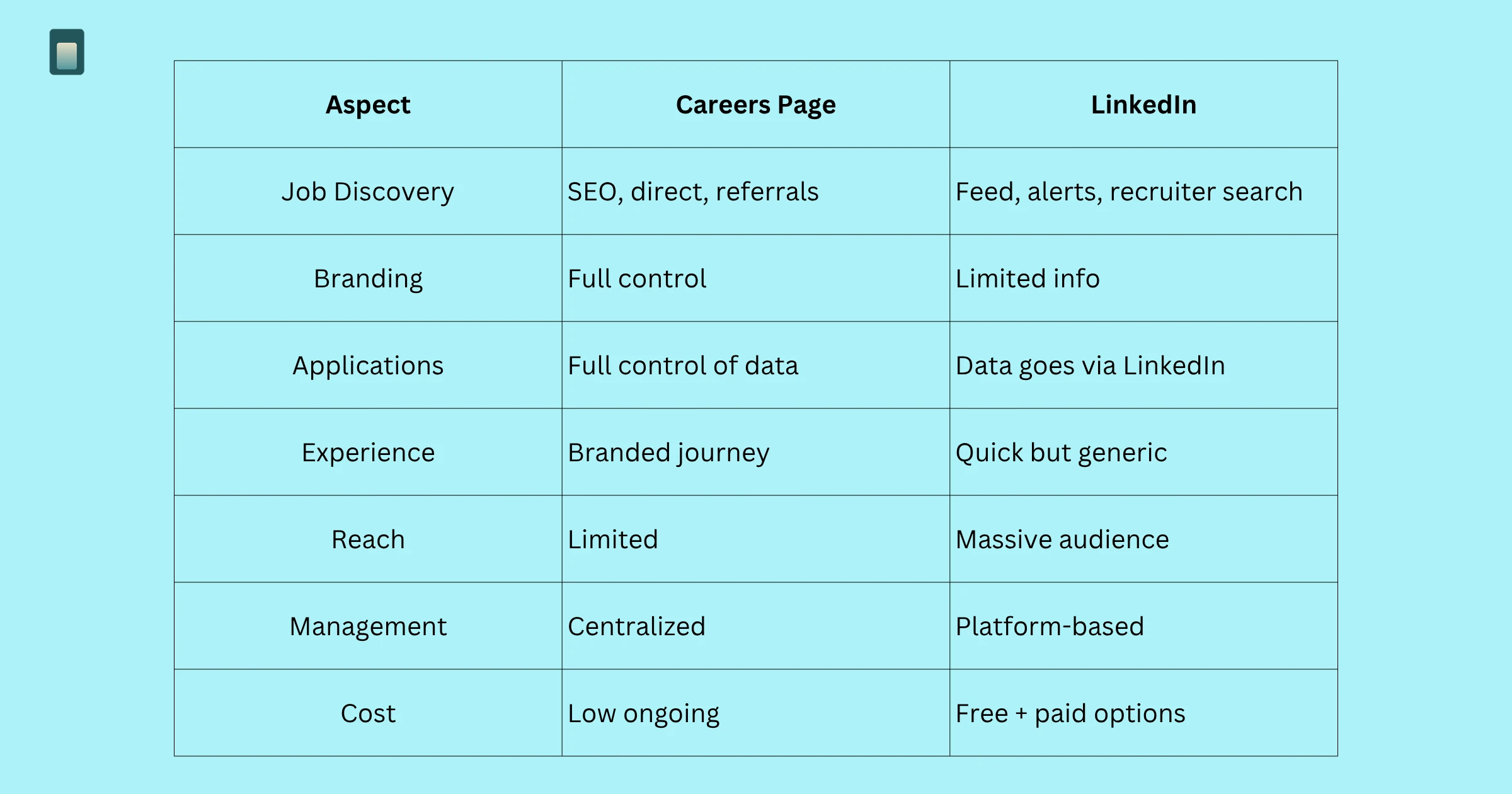
- Job discovery: A careers page relies on organic search (Google), direct traffic, and referrals. LinkedIn surfaces your role through its feed, job alerts, and recruiter searches.
- Employer branding: A careers page gives you full control over culture, visuals, story, and benefits. LinkedIn limits you to a logo, a description, and basic company info.
- Application control: With a careers page, you own the form, the flow, and the data. LinkedIn's Easy Apply sends candidate data to LinkedIn first, before it reaches you.
- Candidate experience: A careers page offers an immersive, branded, informative journey. LinkedIn is fast and convenient, but generic.
- Audience reach: A careers page has limited reach without external promotion. LinkedIn gives you immediate access to over a billion professionals.
- Candidate management: A careers page centralizes everything in your own system. LinkedIn keeps applications fragmented within its own platform.
- Cost: A careers page has a low ongoing cost once built. LinkedIn offers free basic posts with paid options for boosted visibility.
Why LinkedIn alone is not enough
LinkedIn is powerful, but relying on it exclusively comes with significant drawbacks that most companies don't fully appreciate until they've felt the impact.
- Limited storytelling space: LinkedIn job posts give you a text box for a job description and not much else. There's no space for team photos, culture videos, benefit highlights, or the kind of rich content that turns a curious candidate into an excited applicant. This is precisely why employer branding plays such a critical role in attracting top talent — the story you tell beyond the job description is often what tips a strong candidate toward applying.
- You don't own the candidate relationship: When someone applies via LinkedIn's Easy Apply, their data lives in LinkedIn's ecosystem first. Your candidate management becomes dependent on a third-party platform.
- Competitor ads appear beside your listing: LinkedIn surfaces competitor job posts to the same candidates browsing your listing. You're essentially advertising in a crowded marketplace with no home advantage.
- Fragmented applications: Candidates from LinkedIn, Indeed, referrals, and direct traffic all land in different places, making it nearly impossible to manage a clean hiring pipeline without a central hub.
Why a Careers Page also needs distribution channels
Building a great careers page is only half the battle. Without active distribution, even the most beautifully designed careers page will sit largely undiscovered — especially for companies that don't yet have significant organic search traffic.
Think of your careers page as your headquarters and LinkedIn as your billboard. The billboard drives traffic; headquarters closes the deal. A careers page without distribution is a store without a sign. A LinkedIn post without a careers page destination is a sign that leads nowhere worth visiting.
The best hiring strategy: Using both together
The most effective hiring funnel works like this: LinkedIn creates awareness and drives discovery, while your careers page builds conviction and converts candidates into applicants. A smooth, well-structured hiring process is what ties the two together — without it, even strong candidate interest can drop off before an offer is made.
First, publish a new role on your careers page with a full job description, requirements, benefits, and an on-brand application experience that reflects your company culture. Then distribute it automatically to LinkedIn, where candidates discover the role through their feed, job alerts, and recruiter searches. Those candidates click through to your careers page, where they get the full picture — your story, culture, team, and why they should join. Finally, they apply directly to your site, and all applications feed into a centralized candidate management system that keeps your pipeline clean and organized.
How SubPage helps you build a Careers Page quickly
SubPage is purpose-built for teams that want a professional, branded careers page without the complexity of building one from scratch or wrestling with an enterprise ATS that costs a fortune.
- Launch in minutes: No developers, no complex setup. Get a professional careers page live under your domain in minutes, not weeks.
- Rich job listings: Create detailed job posts with descriptions, required skills, salary ranges, and benefits content that goes far beyond what LinkedIn can accommodate.
- Built-in candidate management: All applications flow into SubPage's candidate management dashboard, giving you a clean, organized pipeline from first click to final hiring decision.
- Custom branding: Customize your careers page to match your brand identity, so every touchpoint in the candidate experience feels intentional and cohesive.
- No enterprise ATS required: Get the core functionality you need to manage hiring without the cost, complexity, or overhead of a traditional enterprise system.
LinkedIn integration with SubPage Careers Page
SubPage's LinkedIn integration is what closes the loop between discovery and conversion. Once you connect your LinkedIn account through the SubPage dashboard — which takes less than a minute — every new role you publish on your careers page is automatically pushed to LinkedIn at the same time. No copy-pasting, no tab-switching, no manual reposting.
From that point on, every opening gets immediate visibility where candidates are already looking — surfaced through LinkedIn's feed, job alerts, and recruiter searches — while all applications still flow back to your careers page and into one centralized pipeline. One action publishes your role everywhere it needs to be.
Benefits of combining Careers Page + LinkedIn Integration
- Wider reach, less effort: One action publishes your job everywhere it needs to be seen. You maximize candidate reach without multiplying your workload.
- Stronger employer branding: LinkedIn drives traffic; your careers page delivers the brand story. Every candidate gets both the reach of LinkedIn and the depth of your owned channel.
- Centralized candidate management: All applicants — regardless of where they discovered the role — apply through your careers page and land in one unified pipeline. No more fragmented inboxes or scattered spreadsheets. Still figuring out the right system? The best 6 applicant tracking systems for small companies are a good place to start.
- Better candidate experience: Candidates who click from LinkedIn to a polished, informative careers page have a fundamentally better experience than those who apply through a bare LinkedIn form with no context.
- Faster time-to-hire: A well-distributed, well-branded job attracts more qualified applicants faster, shortening your hiring cycle and reducing cost-per-hire.
Conclusion
The debate between a careers page and LinkedIn job posts is a false choice — both work best together. LinkedIn helps people discover your jobs, while your careers page convinces them to apply.
When connected, they create a stronger hiring funnel: LinkedIn brings the right candidates, and your careers page converts them. With SubPage, you can manage both easily and focus on hiring the right people.
Ready to get started? Create a professional careers page with SubPage, publish jobs to LinkedIn in one click, and manage applicants in one place.

